Showing posts with label Oracle. Show all posts

Monday, March 17, 2014

16TB Datawarehouse Appliance using a Sun E20K and Oracle (circa 2008)

We created a 16 TB Data Warehouse Appliance with Oracle and a Sun E20K server and Sun StorageTek 6540 Arrays, circa 2008 pre Oracle Exadata, we wanted to get 6 GB/sec from the Appliance. In that Data warehouse Appliance we wanted to achieve 1 GB/s from each of the arrays. Each Array was connected to 1 dual ported HBA, where each HBA port delivered 4Gbps ie. 2 x 512 MB/s

We tested it by connecting the first storage array, and made sure that it delivered 1 GB/s. Next, we connect the second storage array and made sure we got 2 GB/s. We continued this till we got 6 GB/s when all 6 storage Arrays were connected to the E20K via 6 dual ported HBAs.

I've put the details of how we configured each of the Storage Arrays to deliver 1 GB/s, and the issues that we hit while trying to scale, under the 'Storage' paragraph.

CPU
As our requirement was a sustained throughput of 6 GB/s, we planned on 36 CPU's of the E20K server where each CPU could deliver 200 MB/sec

The rough estimate formula for the number of  CPUs from Oracle is:

<number of CPUs> = <maximum throughput in MB/s> / 200

Memory
We can derive the amount of memory that we need from the amount of CPU's that we are using
<amount of memory in GB> = 2 * <number of CPUs>

Storage:
Calculating the Maximum Throughput of a HBA port:

Lets say we have a really old HBA on our sever, with a 1Gbps port. Then the Maximum Throughput that we can get from that port is 128 MB/s


1 Gbps = 1/8 bits = 0.125 GigaBytes
0.125 x 1024 = 128 MB/sec

Now lets say we replace that HBA with a new one that has 4 Gbps ports. The Maximum Throughput that we can get from that port is 512 MB/s

 4 Gbps = 4/8 = 0.5 GibaBytes
0.5 x 1024 = 512 GB/sec

16 LUNs were created in each Storage Array. Each LUN had 4 disk (3+1 RAID 5), and each disk was 136GB. So we got roughly half a Terabyte (408GB) from each LUN.

To create the above configuration we started with 1 Storage Array, and had it connected to the E20K server. We then measured the throughput we got from a single drive. Next, we created a RAID 5 LUN, to which we kept adding disks. When we noticed that the throughput wasn't increasing that is when we stopped and got our LUN configuration of 3+1 RAID 5.

Issues we hit during the Storage configuration:
  • We used vdbench, Oracle's ORION tool and the native "dd" tool to configure the storage. After configuring the LUNs we gave the system and storage to the Oracle team to run their ORION tests. After running some of their tests the Oracle team got back saying that the Storage and I/O sub-system had issues, as it did not deliver the required throughput of 1 GB/s. They said that they double checked it using the dd command.  After getting the hardware back from the Oracle team, we figured the issue actually came from the ORION tool, which back then had a bug(it was single threaded). We also proved to the Oracle team that running a sing "dd" instance did not prove anything. We convinced them by running number of "dd" instances in parallel. We could clearly see that we we increased the number of dd's the throughput started increasing
  •  The second issue that we hit was when we tried to scale. After getting 1 GB/s from our first Storage, we connected the second Storage Array, and that gave us 2 GB/s as we had expected. On adding the third Storage Array we saw that the throughput was did not increase, but still delivered 2 GB/s. After analysing the storage sub-system thoroughly we learnt that the issue was with the way we had connected to the Storage Array to the E20K server. The Sun Fire E25K/E20K hot-swap PCI assembly architecture (hsPCI-X/hsPCI+) has two I/O controllers. Each controller provides one 33-MHz peripheral component interconnect (PCI) bus and three 33/66/90 MHz PCI buses for a total of four on each I/O assembly. Therefore, each I/O assembly has four hot-swap component PCI slots. A Sun Fire I/O assembly has a 2.4 Gbyte/sec connection to the rest of the system.So when we connected our first two storage arrays to the I/O assembly we were fine as we were within the 2.4 Gbyte/sec limit, but saw the issue when the third storage array was connected. We resolved the issue by connecting the other arrays to a different I/O assembly (The E20K has 9 I/O assemblies in total).
The above idea and method can be used to create any appliance, particularly a Hadoop appliance.

Wednesday, November 20, 2013

Installing Oracle 12c Grid

As use 'oracle' run runInstaller the grid directory created after untaring the grid binaries.


Tuesday, October 29, 2013

Oracle 12c: cloning a PDB

Out here I create a clone of testdb1(PDB). The clone testdb2(PDB) is on the same CDB(testdb)

SQL> alter pluggable database testdb1 close;

Pluggable database altered.

SQL> alter pluggable database testdb1 open read only;

Pluggable database altered.


SQL>
SQL> create pluggable database testdb2 from testdb1 FILE_NAME_CONVERT=('/u02/app/oracle/oradata/testdb/testdb1','/u02/app/oracle/oradata/testdb/testdb2');
create pluggable database testdb2 from testdb1 FILE_NAME_CONVERT=('/u02/app/oracle/oradata/testdb/testdb1','/u02/app/oracle/oradata/testdb/testdb2')
*
ERROR at line 1:
ORA-65005: missing or invalid file name pattern for file -
/u02/app/oracle/product/12.1.0/dbhome_1/dbs/soe.dbf

The above error was due to the fact that I had not added the datafile soe.dbf from SOE tablespace into the FILE_NAME_CONVERT list. By adding it as shown below, resolved the issue.

 The below operation not allowed from within a pluggable database, and needs to be executed from within the CDB. If we execute it withing testdb1, we will get the following error message: ORA-65040: operation not allowed from within a pluggable database.


SQL> create pluggable database testdb2 from testdb1 FILE_NAME_CONVERT=('/u02/app/oracle/oradata/testdb/testdb1','/u02/app/oracle/oradata/testdb/testdb2','/u02/app/oracle/product/12.1.0/dbhome_1/dbs/soe.dbf','/u02/app/oracle/oradata/testdb/testdb2/soe.dbf');

Pluggable database created.

SQL>

We see below that the datafiles have been added to the directory testdb2

-bash-3.2$ pwd
/u02/app/oracle/oradata/testdb/testdb2
-bash-3.2$ ls
soe.dbf  sysaux01.dbf  system01.dbf  temp01.dbf  testdb1_users01.dbf
-bash-3.2$ ls -lrt
total 4397364
-rw-r----- 1 oracle oinstall   20979712 Oct 29 22:50 temp01.dbf
-rw-r----- 1 oracle oinstall    5251072 Oct 29 22:50 testdb1_users01.dbf
-rw-r----- 1 oracle oinstall  272637952 Oct 29 22:50 system01.dbf
-rw-r----- 1 oracle oinstall  650125312 Oct 29 22:50 sysaux01.dbf
-rw-r----- 1 oracle oinstall 3570409472 Oct 29 22:50 soe.dbf
-bash-3.2$

Below we open the newly created clone database testdb2

SQL> alter pluggable database testdb2 open;

Pluggable database altered.

SQL>

 Next, we close testdb1 which is in read only node and re-open it again.

SQL> alter pluggable database testdb1 close;


Pluggable database altered.

SQL> SQL> alter pluggable database testdb1 open ;

Pluggable database altered.

SQL>

Below we connect to the CDB (testdb) and see that datafiles for the clone PDB (testdb2) now shows up when listing the datafiles.

-bash-3.2$ sqlplus / as sysdba

SQL*Plus: Release 12.1.0.1.0 Production on Tue Oct 29 22:55:05 2013

Copyright (c) 1982, 2013, Oracle.  All rights reserved.


Connected to:
Oracle Database 12c Enterprise Edition Release 12.1.0.1.0 - 64bit Production
With the Partitioning, OLAP, Advanced Analytics and Real Application Testing options

SQL> show con_name

CON_NAME
------------------------------
CDB$ROOT
SQL> show con_id

CON_ID
------------------------------
1
SQL> select name from v$datafile;

NAME
--------------------------------------------------------------------------------
/u02/app/oracle/oradata/testdb/system01.dbf
/u02/app/oracle/oradata/testdb/sysaux01.dbf
/u02/app/oracle/oradata/testdb/undotbs01.dbf
/u02/app/oracle/oradata/testdb/pdbseed/system01.dbf
/u02/app/oracle/oradata/testdb/users01.dbf
/u02/app/oracle/oradata/testdb/pdbseed/sysaux01.dbf
/u02/app/oracle/oradata/testdb/testdb1/system01.dbf
/u02/app/oracle/oradata/testdb/testdb1/sysaux01.dbf
/u02/app/oracle/oradata/testdb/testdb1/testdb1_users01.dbf
/u02/app/oracle/product/12.1.0/dbhome_1/dbs/soe.dbf
/u02/app/oracle/oradata/testdb/testdb2/system01.dbf

NAME
--------------------------------------------------------------------------------
/u02/app/oracle/oradata/testdb/testdb2/sysaux01.dbf
/u02/app/oracle/oradata/testdb/testdb2/testdb1_users01.dbf
/u02/app/oracle/oradata/testdb/testdb2/soe.dbf

14 rows selected.

SQL>

Oracle 12c: control, data, redo log, and temp files in CDB and PDB

After creating the PDB as shown in the previous post, I created the Order Entry schema using Swingbench.
Below we will see the how the control files, data files, redo log files, and the temp files are used by the CDB (testdb) and the PDB (testdb1) 

-bash-3.2$ echo $ORACLE_SID
testdb
-bash-3.2$ sqlplus / as sysdba

SQL*Plus: Release 12.1.0.1.0 Production on Tue Oct 29 09:22:28 2013

Copyright (c) 1982, 2013, Oracle.  All rights reserved.


Connected to:
Oracle Database 12c Enterprise Edition Release 12.1.0.1.0 - 64bit Production
With the Partitioning, OLAP, Advanced Analytics and Real Application Testing options

SQL>
SQL> show con_name

CON_NAME
------------------------------
CDB$ROOT
SQL> show con_id

CON_ID
------------------------------
1
SQL> select name from v$datafile;

NAME
--------------------------------------------------------------------------------
/u02/app/oracle/oradata/testdb/system01.dbf
/u02/app/oracle/oradata/testdb/sysaux01.dbf
/u02/app/oracle/oradata/testdb/undotbs01.dbf
/u02/app/oracle/oradata/testdb/pdbseed/system01.dbf
/u02/app/oracle/oradata/testdb/users01.dbf
/u02/app/oracle/oradata/testdb/pdbseed/sysaux01.dbf
/u02/app/oracle/oradata/testdb/testdb1/system01.dbf
/u02/app/oracle/oradata/testdb/testdb1/sysaux01.dbf
/u02/app/oracle/oradata/testdb/testdb1/testdb1_users01.dbf
/u02/app/oracle/product/12.1.0/dbhome_1/dbs/soe.dbf

10 rows selected.

SQL> select con_id,name from v$tempfile;

    CON_ID
----------
NAME
--------------------------------------------------------------------------------
         1
/u02/app/oracle/oradata/testdb/temp01.dbf

         2
/u02/app/oracle/oradata/testdb/pdbseed/pdbseed_temp01.dbf

         3
/u02/app/oracle/oradata/testdb/testdb1/temp01.dbf


SQL> select name from v$controlfile;

NAME
--------------------------------------------------------------------------------
/u02/app/oracle/oradata/testdb/control01.ctl
/u02/app/oracle/fast_recovery_area/testdb/control02.ctl

SQL> select member from v$logfile;

MEMBER
--------------------------------------------------------------------------------
/u02/app/oracle/oradata/testdb/redo03.log
/u02/app/oracle/oradata/testdb/redo02.log
/u02/app/oracle/oradata/testdb/redo01.log

SQL>

Next we change the session container to the PDB (testdb1).

SQL> ALTER SESSION SET CONTAINER =testdb1;

Session altered.

SQL> show con_name

CON_NAME
------------------------------
TESTDB1
SQL> show con_id

CON_ID
------------------------------
3
SQL> select name from v$datafile;

NAME
--------------------------------------------------------------------------------
/u02/app/oracle/oradata/testdb/undotbs01.dbf
/u02/app/oracle/oradata/testdb/testdb1/system01.dbf
/u02/app/oracle/oradata/testdb/testdb1/sysaux01.dbf
/u02/app/oracle/oradata/testdb/testdb1/testdb1_users01.dbf
/u02/app/oracle/product/12.1.0/dbhome_1/dbs/soe.dbf

SQL> select con_id,name from v$tempfile;

    CON_ID
----------
NAME
--------------------------------------------------------------------------------
         3
/u02/app/oracle/oradata/testdb/testdb1/temp01.dbf


SQL> select name from v$controlfile;

NAME
--------------------------------------------------------------------------------
/u02/app/oracle/oradata/testdb/control01.ctl
/u02/app/oracle/fast_recovery_area/testdb/control02.ctl

SQL> select member from v$logfile;

MEMBER
--------------------------------------------------------------------------------
/u02/app/oracle/oradata/testdb/redo03.log
/u02/app/oracle/oradata/testdb/redo02.log
/u02/app/oracle/oradata/testdb/redo01.log

SQL>

Monday, October 28, 2013

Creating an Oracle 12c database using dbca

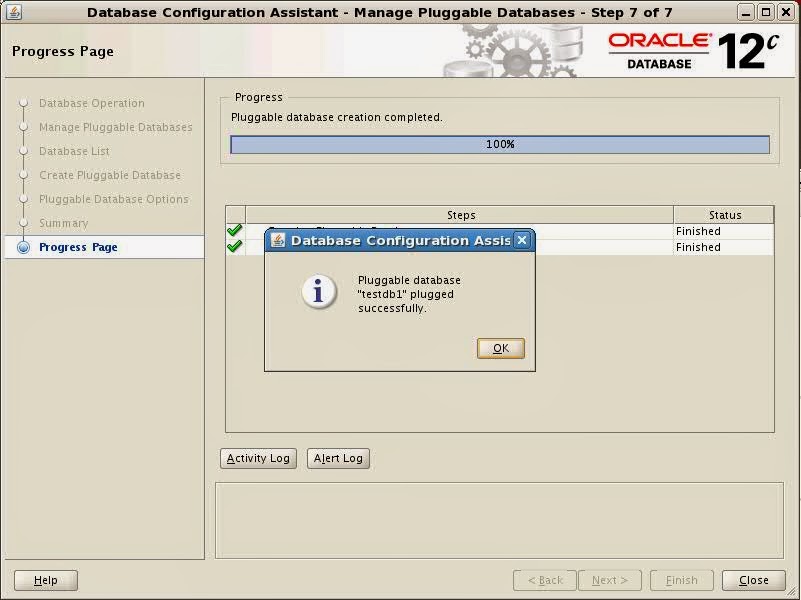
The screen shots below show the creation of an Oracle 12c database using dbca as user oracle.


Installing Oracle 12c R1 on Linux

Below are the screen shots of installing Oracle 12c (12.1.0.1.0) Single Instance on RedHat Linux

Below are the screens see on running runInstaller as user oracle.


Tuesday, July 23, 2013

Incompatible version of libocijdbc[Jdbc:112020, Jdbc-OCI:112030

I fixed the "Incompatible version of libocijdbc[Jdbc:112020, Jdbc-OCI:112030" error message that we were seeing while starting swingbench with Oracle oci Driver

Here is what I did to fix the issue:
Installed an older version of Oracle Client on the machine, and then did the following

bash-4.2$ pwd
/swingbench/swingbench/lib
bash-4.2$ cp /oh/product/11.2.0/client_2/instantclient/ojdbc5.jar .
bash-4.2$
bash-4.2$ ls -lrt
total 33888
-rw-r--r--    1 oracle   dba          479413 Mar  7 19:52 ucp.jar
-rw-r--r--    1 oracle   dba        11512178 Mar  7 19:52 swingbench.jar
-rw-r--r--    1 oracle   dba           20349 Mar  7 19:52 simplefan.jar
-rw-r--r--    1 oracle   dba           70569 Mar  7 19:52 ons.jar
-rw-r--r--    1 oracle   dba         2152849 Mar  7 19:52 ojdbc6.jar
drwxr-xr-x    2 oracle   dba             256 Mar  7 19:52 launcher
-rw-r--r--    1 oracle   dba          999966 Mar  7 19:52 ant.jar
-rw-r--r--    1 oracle   dba         2095661 Mar  7 19:53 ojdbc5.jar

bash-4.2$ cp ojdbc5.jar ojdbc6.jar

That did it.

Thursday, June 20, 2013

ORA-15032: not all alterations performed ORA-15027: active use of diskgroup "DATA" precludes its dismount

I was trying to start "fresh", so I tried to dismount the ASM diskgroups before trying to drop them. While trying to dismount using the ASM Configuration Assistant, I got the following error messages.

ORA-15032: not all alterations performed
ORA-15027: active use of diskgroup "DATA" precludes its dismount


The fix to this is to drop the database first, and after that dismount the ASM Diskgroup

Wednesday, September 12, 2012

Oracle Enterprise Manager: Cannot communicate securely with peer: no common encryption algorithm(s). (Error code: ssl_error_no_cypher_overlap)

When attempting to connect to the Oracle Enterprise Manager using  Firefox 15.0.1 or later, the following message is displayed:
Cannot communicate securely with peer: no common encryption algorithm(s).  (Error code: ssl_error_no_cypher_overlap)


Solution
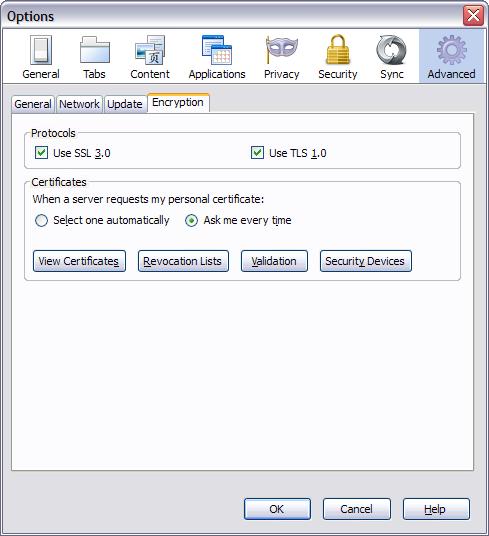
To allow secure connection to the Oracle Enterprise Manager with Firefox 15.0.1 and later, you must ensure that TLS has been enabled.

To do this, complete the following steps:

        In Firefox, click Tools > Options.
        In the Options notebook, click the Advanced tab.
        Click the Encryption tab.
        In the Protocols section, click Use TLS 1.0.
        Click OK.


Attempt to re-connect to the Oracle Enterprise Manager page. An Untrusted Connection message is displayed.
        Click Add Exception. The Add Security Exception window is displayed.
        Click Confirm Security Exception. The Oracle Enterprise Manager page is displayed