Monday, November 7, 2011

Setting up R on Red Hat Linux

Thought of giving R programing a shot to create graph, so I downloaded the source code and compiled it on my Red Hat Linux server.


[root@isvx7 ~]# uname -a
Linux isvx7.storage.tucson.ibm.com 2.6.18-274.3.1.el5 #1 SMP Fri Aug 26 18:49:02 EDT 2011 x86_64 x86_64 x86_64 GNU/Linux


So as user root I created a directory called r_prog. Under directory I created a directory called
source. I then cd'ed on to the source directory and downloaded the source code for R.


[root@isvx7 source]# wget http://cran.r-project.org/src/base/R-2/R-2.14.0.tar.gz

I next untared to .gz file


[root@isvx7 source]# tar -xvf R-2.14.0.tar.gz

Next I cd onto the directory R-2.14.0 and ran "configure"


[root@isvx7 source]# ./configure

.....
.....
....

R is now configured for x86_64-unknown-linux-gnu

  Source directory:          .
  Installation directory:    /usr/local

  C compiler:                gcc -std=gnu99  -g -O2
  Fortran 77 compiler:       gfortran  -g -O2

  C++ compiler:              g++  -g -O2
  Fortran 90/95 compiler:    gfortran -g -O2
  Obj-C compiler:

  Interfaces supported:      X11
  External libraries:        readline
  Additional capabilities:   PNG, JPEG, TIFF, NLS, cairo
  Options enabled:           shared BLAS, R profiling, Java

  Recommended packages:      yes

configure: WARNING: you cannot build PDF versions of the R manuals
configure: WARNING: you cannot build PDF versions of all the help pages
[root@isvx7 R-2.14.0]#

I then ran the "make" and "make check" command as shown below.

[root@isvx7 R-2.14.0]# make
......
......
......


[root@isvx7 R-2.14.0]# make check
make[1]: Entering directory `/root/r_prog/source/R-2.14.0/tests'
make[2]: Entering directory `/root/r_prog/source/R-2.14.0/tests'
make[3]: Entering directory `/root/r_prog/source/R-2.14.0/tests/Examples'
Testing examples for package âbaseâ
  comparing âbase-Ex.Routâ to âbase-Ex.Rout.prevâ ...
5654c5654
< 54
---
> 14
Testing examples for package âtoolsâ
  comparing âtools-Ex.Routâ to âtools-Ex.Rout.saveâ ... OK
Testing examples for package âutilsâ
  comparing âutils-Ex.Routâ to âutils-Ex.Rout.prevâ ... OK
Testing examples for package âgrDevicesâ
  comparing âgrDevices-Ex.Routâ to âgrDevices-Ex.Rout.saveâ ... OK
Testing examples for package âgraphicsâ
  comparing âgraphics-Ex.Routâ to âgraphics-Ex.Rout.saveâ ... OK
Testing examples for package âstatsâ
  comparing âstats-Ex.Routâ to âstats-Ex.Rout.saveâ ... OK
Testing examples for package âdatasetsâ
  comparing âdatasets-Ex.Routâ to âdatasets-Ex.Rout.saveâ ... OK
Testing examples for package âmethodsâ
  comparing âmethods-Ex.Routâ to âmethods-Ex.Rout.prevâ ... OK
..............................................................
..............................................................
..............................................................
..............................................................
running code in 'reg-plot-latin1.R' ... OK
  comparing 'reg-plot-latin1.ps' to './reg-plot-latin1.ps.save' ... OK
make[3]: Leaving directory `/root/r_prog/source/R-2.14.0/tests'
make[2]: Leaving directory `/root/r_prog/source/R-2.14.0/tests'
make[2]: Entering directory `/root/r_prog/source/R-2.14.0/tests'
running tests of Internet and socket functions
  expect some differences
make[3]: Entering directory `/root/r_prog/source/R-2.14.0/tests'
running code in 'internet.R' ... OK
  comparing 'internet.Rout' to './internet.Rout.save' ...17c17
< [1] 3373
---
> [1] 3383
 OK
make[3]: Leaving directory `/root/r_prog/source/R-2.14.0/tests'
make[2]: Leaving directory `/root/r_prog/source/R-2.14.0/tests'
make[1]: Leaving directory `/root/r_prog/source/R-2.14.0/tests'
[root@isvx7 R-2.14.0]#

If you get a whole bunch of OK's then R is ready to go.


[root@isvx7 R-2.14.0]# ls
bin            COPYING  libtool      Makefrag.cc     ONEWS         tests
ChangeLog      doc      m4           Makefrag.cc_lo  OONEWS        tools
config.log     etc      Makeconf     Makefrag.cxx    po            VERSION
config.site    include  Makeconf.in  Makefrag.m      README
config.status  INSTALL  Makefile     modules         share
configure      lib      Makefile.fw  NEWS            src
configure.ac   library  Makefile.in  NEWS.pdf        SVN-REVISION
[root@isvx7 R-2.14.0]#

Now go into the bin directory and run R.


[root@isvx7 R-2.14.0]# cd bin
[root@isvx7 bin]# ls
BATCH    config   javareconf     pager   Rdconv      Rprof    Stangle
build    exec     libtool        R       Rdiff       Rscript  Sweave
check    f77_f2c  LINK           Rcmd    REMOVE      rtags
COMPILE  INSTALL  mkinstalldirs  Rd2dvi  Rplots.pdf  SHLIB
[root@isvx7 bin]# ./R

R version 2.14.0 (2011-10-31)
Copyright (C) 2011 The R Foundation for Statistical Computing
ISBN 3-900051-07-0
Platform: x86_64-unknown-linux-gnu (64-bit)

R is free software and comes with ABSOLUTELY NO WARRANTY.
You are welcome to redistribute it under certain conditions.
Type 'license()' or 'licence()' for distribution details.

  Natural language support but running in an English locale

R is a collaborative project with many contributors.
Type 'contributors()' for more information and
'citation()' on how to cite R or R packages in publications.

Type 'demo()' for some demos, 'help()' for on-line help, or
'help.start()' for an HTML browser interface to help.
Type 'q()' to quit R.

[Previously saved workspace restored]

>

At this point I tried the example provided in for the following link:
http://www.harding.edu/fmccown/r/


>
> cars <- c(1, 3, 6, 4, 9)
> plot(cars)
> q()
Save workspace image? [y/n/c]: y
[root@isvx7 bin]#
This created a graph called Rplots.pdf under the current directory.


Thursday, October 20, 2011

Protocol used by RMAN to communicate with the Oracle server

I just wanted to see what happens from a server process point of view when I run "rman" from a
the command. So from one terminal I ran "rman" as follows
bash-3.2$ rman target /
When I did that I observed that there were three new processes
that were started on the server. The rman process is the obvious one, but then other two processes which were the child processes of the rman process.
>   oracle 32309274 30998642   0 22:01:57  pts/0  0:00 rman target /
55a57
>   oracle 34275468 32309274   0 22:01:57      -  0:00 oracletestasm (DESCRIPTION=(LOCAL=YES)(ADDRESS=(PROTOCOL=beq)))
58a61
>   oracle 37421080 32309274   0 22:01:58      -  0:00 oracletestasm (DESCRIPTION=(LOCAL=YES)(ADDRESS=(PROTOCOL=beq)))
isvp14_ora>
Which got me curious about the PROTOCOL=beq. Reading throught the docs I found out the following abot the BEQ Protocol

  • The BEQ Protocol Adapter, is both a communications mechanism and a process spawning mechanism.
  •  If a service name is not specified, either directly by the user on the command line or the login screen, or indirectly through an environment variable, then the BEQ Protocol Adapter will be used.
  • When the BEQ Protocol is used a dedicated server will always be used, and the multi-threaded server will never be used.
  •  This dedicated server is started automatically by the BEQ Protocol Adapter, which waits for the server process to start and attach to an existing SGA. If the startup of the server process is successful, the BEQ Protocol Adapter then provides inter-process communication via UNIX pipes.
  •  An important feature of the BEQ Protocol Adapter is that no network Listener is required for its operation, since the adapter is linked into the client tools and directly starts its own server process with no outside interaction.
  •  Another thing to note is that the BEQ Protocol Adapter is always installed, and always linked in to all client tools.

Wednesday, October 12, 2011

Oracle ASM and data rebalancing between the volumes

In this post I want to show how data is distributed evenly between all the volumes of an Oracle ASM diskgroup eg. If we have 2 x 100 GB volumes in our disk group, and 100 GB of data. Then the data is distributed evenly between each of the volumes ie. the first volume will have 50GB and the second volume will have 50GB. Now if I add a 3rd volume to the disk group, then the data will be re-balanced between the three volumes ie. each volume will have 33.33GB of the data.

The initial distribution of data between the volumes, and the later re-balancing of the data is done based on the current data capacity, and not on the I/O pattern. This means that if we do have a table that is heavily accessed, we could potentially have hot-spots and degradation in performance due to the limitations of HDD disks.

Here is the informtion I got just after creating the Oracle ASM diskgroup +DATA using hdisk21, hdisk22, hdisk23, and hdisk24 on an AIX system. Each volume in this case is 300 GB


SQL> select name, path, free_mb, total_mb from v$asm_disk;

NAME
------------------------------
PATH
--------------------------------------------------------------------------------
   FREE_MB   TOTAL_MB
---------- ----------

DATA_0000
/dev/rhdisk21

NAME
------------------------------
PATH
--------------------------------------------------------------------------------
   FREE_MB   TOTAL_MB
---------- ----------
    307180     307200

DATA_0001
/dev/rhdisk22
    307185     307200

DATA_0002

NAME
------------------------------
PATH
--------------------------------------------------------------------------------
   FREE_MB   TOTAL_MB
---------- ----------
/dev/rhdisk23
    307184     307200

DATA_0003
/dev/rhdisk24
    307185     307200


4 rows selected.

SQL>

After creating the database, schema, tables, and filling it with data, here is what I have. As you see the data is evenly distributed between all the volumes of the Oracle ASM diskgroup.


SQL> select name,path, free_mb, total_mb from v$asm_disk;

NAME
------------------------------
PATH
--------------------------------------------------------------------------------
   FREE_MB   TOTAL_MB
---------- ----------

DATA_0000
/dev/rhdisk21

NAME
------------------------------
PATH
--------------------------------------------------------------------------------
   FREE_MB   TOTAL_MB
---------- ----------
    161103     307200

DATA_0001
/dev/rhdisk22
    161111     307200

DATA_0002

NAME
------------------------------
PATH
--------------------------------------------------------------------------------
   FREE_MB   TOTAL_MB
---------- ----------
/dev/rhdisk23
    161113     307200

DATA_0003
/dev/rhdisk24
    161108     307200

4 rows selected.

SQL>

Tuesday, October 11, 2011

Increase the redo log file size on a live system

While running a workload on my test system I noticed in the AWR report that in the Top 5 Timed Foreground Events "log file switch (checkpoint incomplete)" was on the top. It was taking around 48.43% DB Time which is rather high.

To resolve the issue it is recommended to increase the size of the redo logs and/or add more redo log groups.

It is not possible to increase the size of an existing red log file, so on a live system where the workload was running I did the following to increase the size of the redo logs:

I added 3 new log files each of size 250M

SQL> alter database add logfile group 4 size 250M;

Database altered.

SQL> alter database add logfile group 5 size 250M;

Database altered.

SQL> alter database add logfile group 6 size 250M;

Database altered.

SQL>
SQL> select group#,status from v$log;

    GROUP# STATUS
---------- ----------------
         1 ACTIVE
         2 INACTIVE
         3 ACTIVE
         4 CURRENT
         5 UNUSED
         6 UNUSED

6 rows selected.

SQL>
SQL> select l.bytes/1024/1024 "Meg",g.member from v$log l,v$logfile g where l.group# = g.group#;

       Meg
----------
MEMBER
--------------------------------------------------------------------------------
        50
+DATA/testasm/onlinelog/group_3.263.764177393

        50
+DATA/testasm/onlinelog/group_2.262.764177393

        50
+DATA/testasm/onlinelog/group_1.261.764177393


       Meg
----------
MEMBER
--------------------------------------------------------------------------------
       250
+DATA/testasm/onlinelog/group_4.276.764264429

       250
+DATA/testasm/onlinelog/group_5.277.764264441

       250
+DATA/testasm/onlinelog/group_6.278.764264449


6 rows selected.


The log files need to be inactive to drop then, so dropped group 1 and 3 first.

SQL> alter database drop logfile group 1;

Database altered.


SQL> alter database drop logfile group 3;

Database altered.

SQL>
SQL> alter system checkpoint;

System altered.

SQL> SELECT GROUP#, ARCHIVED, STATUS FROM V$LOG;

    GROUP# ARC STATUS
---------- --- ----------------
         2 NO  INACTIVE
         4 NO  INACTIVE
         5 NO  ACTIVE
         6 NO  CURRENT

In then dropped log file 2:

SQL> alter database drop logfile group 2;

Database altered.

SQL> SELECT GROUP#, ARCHIVED, STATUS FROM V$LOG;

    GROUP# ARC STATUS
---------- --- ----------------
         4 NO  INACTIVE
         5 NO  ACTIVE
         6 NO  CURRENT

SQL>
SQL> alter system switch logfile;

System altered.

SQL> SELECT GROUP#, ARCHIVED, STATUS FROM V$LOG;

    GROUP# ARC STATUS
---------- --- ----------------
         4 NO  ACTIVE
         5 NO  CURRENT
         6 NO  ACTIVE


SQL>

There we go, I now have 3 redo log each of 250M

SQL> select l.bytes/1024/1024 "Meg",g.member from v$log l,v$logfile g where l.group# = g.group#;

       Meg
----------
MEMBER
--------------------------------------------------------------------------------
       250
+DATA/testasm/onlinelog/group_4.276.764264429

       250
+DATA/testasm/onlinelog/group_5.277.764264441

       250
+DATA/testasm/onlinelog/group_6.278.764264449

Monday, October 10, 2011

Increasing the Maximum number of PROCESSES allowed per user in AIX 7.1

One thing to remember while running Oracle benchmark clients is to increase the maximum number of processes the user(oracle in this case) can handle on the database server(AIX) side. You can use "ulimit -a" to check the current "max user processes"

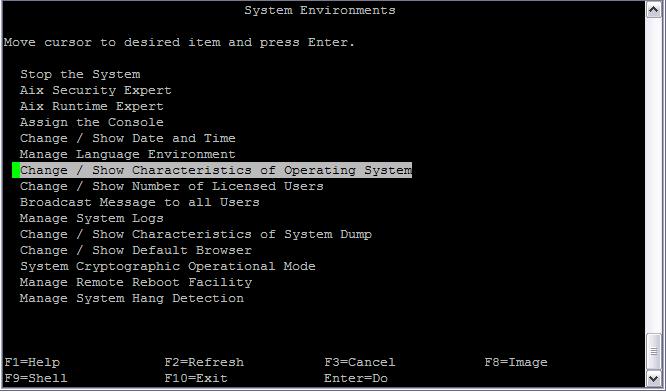
To increase the "max user processes" on an AIX server, run smitty -> select System Environments -> select  Change / Show Characteristics of Operating System -> Maximum number of PROCESSES allowed per user       [600]  ->  press Enter


isvp14_ora> smitty
Login  as user oracle and run "ulimit -a". You will see that the maximum user processes has increased to 600.

Wednesday, September 28, 2011

Oracle ASM: ORA-01078: failure in processing system parameters and ORA-29701: unable to connect to Cluster Synchronization Service

Recently we had a power outage in our lab which caused all the Linux servers running Oracle database, switches, storage to go down. When the power was restored the servers, storages, and switches were brought up cleanly.

I noticed that Oracle ASM instance was down, so I tried to manually start it and got the ORA-01078 and ORA-29701 error messages.


sh-3.2$ sqlplus / as sysasm

SQL*Plus: Release 11.2.0.1.0 Production on Wed Sep 28 15:20:59 2011

Copyright (c) 1982, 2009, Oracle.  All rights reserved.

Connected to an idle instance.

SQL> startup;
ORA-01078: failure in processing system parameters
ORA-29701: unable to connect to Cluster Synchronization Service
SQL>


-bash-3.2$ . ./.bash_profile_grid
-bash-3.2$ echo $ORACLE_HOME
/u01/app/oracle/product/11.2.0/grid
-bash-3.2$ which crsctl
/u01/app/oracle/product/11.2.0/grid/bin/crsctl

Tried to use crsctl to start all the Oracle resources

-bash-3.2$ crsctl start resource -all
CRS-5702: Resource 'ora.LISTENER.lsnr' is already running on 'isvx7'
CRS-2672: Attempting to start 'ora.cssd' on 'isvx7'
CRS-2679: Attempting to clean 'ora.diskmon' on 'isvx7'
CRS-2681: Clean of 'ora.diskmon' on 'isvx7' succeeded
CRS-2672: Attempting to start 'ora.diskmon' on 'isvx7'
CRS-2676: Start of 'ora.diskmon' on 'isvx7' succeeded
CRS-2676: Start of 'ora.cssd' on 'isvx7' succeeded
CRS-2672: Attempting to start 'ora.asm' on 'isvx7'
CRS-2676: Start of 'ora.asm' on 'isvx7' succeeded
CRS-2672: Attempting to start 'ora.DATA.dg' on 'isvx7'
ORA-15032: not all alterations performed
ORA-15017: diskgroup "DATA" cannot be mounted
ORA-15063: ASM discovered an insufficient number of disks for diskgroup "DATA"
CRS-2674: Start of 'ora.DATA.dg' on 'isvx7' failed
CRS-2679: Attempting to clean 'ora.DATA.dg' on 'isvx7'
CRS-2681: Clean of 'ora.DATA.dg' on 'isvx7' succeeded
CRS-4000: Command Start failed, or completed with errors.
-bash-3.2$

On the Linux server running Oracle

[root@isvx7 ~]# multipath -d -l
mulipath.conf line 111, invalid keyword: prio
mpath144 (36005076802828000c000000000000050) dm-3 IBM,2145
[size=300G][features=0][hwhandler=0][rw]
\_ round-robin 0 [prio=0][active]
 \_ 5:0:3:3 sdaf 65:240 [active][undef]
 \_ 6:0:3:3 sdag 66:0   [active][undef]
 \_ 5:0:0:3 sdh  8:112  [active][undef]
 \_ 6:0:0:3 sdi  8:128  [active][undef]
 \_ 6:0:1:3 sdp  8:240  [active][undef]
 \_ 5:0:1:3 sdq  65:0   [active][undef]
 \_ 5:0:2:3 sdx  65:112 [active][undef]
 \_ 6:0:2:3 sdy  65:128 [active][undef]
mpath143 (36005076802828000c000000000000053) dm-2 IBM,2145
[size=300G][features=0][hwhandler=0][rw]
\_ round-robin 0 [prio=0][active]
 \_ 5:0:3:2 sdad 65:208 [active][undef]
 \_ 6:0:3:2 sdae 65:224 [active][undef]
 \_ 5:0:0:2 sdf  8:80   [active][undef]
 \_ 6:0:0:2 sdg  8:96   [active][undef]
 \_ 5:0:1:2 sdn  8:208  [active][undef]
 \_ 6:0:1:2 sdo  8:224  [active][undef]
 \_ 5:0:2:2 sdv  65:80  [active][undef]
 \_ 6:0:2:2 sdw  65:96  [active][undef]
mpath142 (36005076802828000c000000000000052) dm-1 IBM,2145
[size=300G][features=0][hwhandler=0][rw]
\_ round-robin 0 [prio=0][active]
 \_ 5:0:3:1 sdab 65:176 [active][undef]
 \_ 6:0:3:1 sdac 65:192 [active][undef]
 \_ 5:0:0:1 sdc  8:32   [active][undef]
 \_ 6:0:0:1 sde  8:64   [active][undef]
 \_ 6:0:1:1 sdl  8:176  [active][undef]
 \_ 5:0:1:1 sdm  8:192  [active][undef]
 \_ 5:0:2:1 sdt  65:48  [active][undef]
 \_ 6:0:2:1 sdu  65:64  [active][undef]
mpath141 (36005076802828000c000000000000051) dm-0 IBM,2145
[size=300G][features=0][hwhandler=0][rw]
\_ round-robin 0 [prio=0][active]
 \_ 5:0:3:0 sdaa 65:160 [active][undef]
 \_ 5:0:0:0 sdb  8:16   [active][undef]
 \_ 6:0:0:0 sdd  8:48   [active][undef]
 \_ 6:0:1:0 sdj  8:144  [active][undef]
 \_ 5:0:1:0 sdk  8:160  [active][undef]
 \_ 6:0:2:0 sdr  65:16  [active][undef]
 \_ 5:0:2:0 sds  65:32  [active][undef]
 \_ 6:0:3:0 sdz  65:144 [active][undef]

When I looked at the owner and group of the disks, I noticed that the they had changed to owner root and group disk. No wonder Oracle is not seeing them.

[root@isvx7 ~]# ls -l /dev/mapper/mpath141
brw-rw---- 1 root disk 253, 0 Sep 28 09:57 /dev/mapper/mpath141
[root@isvx7 ~]# ls -l /dev/mapper/mpath142
brw-rw---- 1 root disk 253, 1 Sep 28 09:57 /dev/mapper/mpath142
[root@isvx7 ~]# ls -l /dev/mapper/mpath143
brw-rw---- 1 root disk 253, 2 Sep 28 09:57 /dev/mapper/mpath143
[root@isvx7 ~]# ls -l /dev/mapper/mpath144
brw-rw---- 1 root disk 253, 3 Sep 28 09:57 /dev/mapper/mpath144
Changed the owner and group of the volumes to oracle and dba

[root@isvx7 ~]# chown -R oracle:dba /dev/mapper/mpath141
[root@isvx7 ~]# chown -R oracle:dba /dev/mapper/mpath142
[root@isvx7 ~]# chown -R oracle:dba /dev/mapper/mpath143
[root@isvx7 ~]# chown -R oracle:dba /dev/mapper/mpath144
[root@isvx7 ~]# ls -l /dev/mapper/mpath143
brw-rw---- 1 oracle dba 253, 2 Sep 28 09:57 /dev/mapper/mpath143
[root@isvx7 ~]#

When I brought up asmca. I saw that the my +DATA diskgroup could now be seen, but was not mounted. I mounted the diskgroup, and everything worked fine after that.


Friday, August 26, 2011

Shrinking the results file to generate graphs using Excel

Here is an example of running swingbench using the clarbench client, and redirecting the results to the file
results_400users_aix_run2_phase1.txt and the error log to swing.err

bash-3.2$./charbench -c swingconfig.xml -a -v users,tpm,tps,resp > results_400users_aix_run2_phase1.txt 2> swing.err

This run was run for a period of 24 hours which generated a result file with 86279 lines
-rw-r--r--    1 oracle   oinstall    2523482 Aug 21 13:58 results_400users_aix_run2_phase1.txt

Author  :        Dominic Giles
Version :        2.4.0.764

Results will be written to results.xml.

Time            Users   TPM     TPS     Response
1:58:42 PM      0       0       0       0
1:58:43 PM      0       0       0       0
1:58:44 PM      0       0       0       0
1:58:45 PM      0       0       0       0
..........    .    .    .    .
..........    .    .    .    .
..........    .    .    .    .
..........    .    .    .    .
1:58:37 PM      398     37324   443     518
1:58:38 PM      398     37297   783     518
1:58:39 PM      398     37519   849     518
1:58:40 PM      398     37622   644     518
1:58:41 PM      398     37740   748     518
1:58:42 PM      398     37806   501     518
1:58:43 PM      -1      37787   781     518

Completed Run.


The problem I found with was that when I tried to create open the results with Excel spreadsheeti, Excel did not
like it as it had far more number of lines than what it would like.

So one way to get around this is to shrink the file. You see that there is a line entry for every second, and
this could definitely be reduced ie. we use 1 data line for every 10 lines.

This can be done with a simple perl script. What this scripts does is read the source file and transfers every
10th line to the shrunk file 


#!/usr/bin/perl
#
# Usage: ./shrink_results.pl <source_file> <shrunk_file>
#


$source_file=$ARGV[0];
$destin_file=$ARGV[1];

if ( ! open RESULT, "<$source_file") {
        usage();
        die "The result file does not exist!";
        exit (1);
        }

open SHRUNK, ">$destin_file" or die "Cannot open file the save the shrunk result
s.\n";

sub usage {
        print STDERR "Usage: ./shrink_results.pl result_file shrunk_file\n";
}

my $lnum = 1;
my $multi = 1;
while ($line = <RESULT>) {
        chomp($line);
        if ($lnum == 10*$multi) {
                print SHRUNK "$line\n";
                $multi++;
        }
        $lnum++;
}

close SHRUNK;
close RESULT;


bash-3.2$ ./shrink_results.pl results_400users_aix_run2_phase1.txt results_400users_aix_run2_phase1_shrunk.txt

This created a shrunk file with only 8627 lines:
bash-3.2$ ls -l results_400users_aix_run2_phase1*.txt
-rw-r--r--    1 oracle   oinstall    2523482 Aug 21 13:58 results_400users_aix_run2_phase1.txt
-rw-r--r--    1 oracle   oinstall     252333 Aug 23 22:25 results_400users_aix_run2_phase1_shrunk.txt

Excel liked the new shrunk file, and the graphs were created.